¶ What is uWebChat?
¶ An introduction
uWebChat is a Microsoft Teams app that integrates with your existing website and offers a live web chat that enables your organization to interact with visitors on your website. uWebChat uses the Microsoft Teams client to hunt agents directly or via an agent group. While hunting an agent, uWebChat determines if the agent is available by using MS Teams or Skype for Business presence functions.
¶ Terminology
| Term | Meaning |
|---|---|
| Agent | A Teams user who has been registered in uWebChat and is able to receive chat requests. |
| Admin agent | An agent with permissions to manage agents, groups, opening hours. |
| Chat user / website visitor | Website visitor who initiates a conversation with an agent (using uWebChat). |
| Presence | The status of the MS Teams client. For example: available, busy, offline, away. The presence will be used to decide whether an agent can be hunted or not. |
| Hunting | The process of finding an agent that can respond to a chat invite. When a chat user initiates a new conversation, uWebChat will check if the requested agent or group is available. |
| Group | A group of agents (group members), which will be hunted one by one when a chat user requests a new group conversation. |
| Group memember | Agents who have been added to a group are called group members. |
¶ Card interaction / uWebChat bot interaction
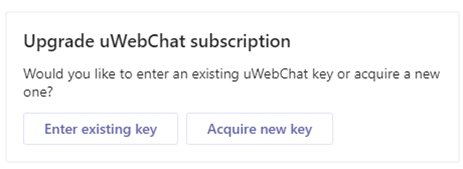
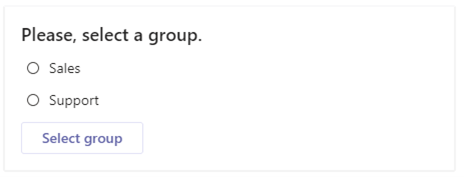
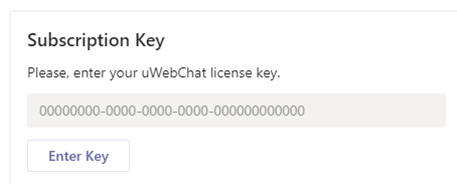
uWebChat uses Rich Cards; cards that contain dynamic content and require user interaction. There are three kinds of rich cards: one that has buttons, a multiple-choice card and one that requires text input.
In the image below, an example of a rich card with buttons is shown. This specific card appears when using the Upgrade command in uWebChat. Simply click on a button to continue.
In the image below, an example of a multiple-choice rich card is shown. This specific card appears when using the Edit group command. Select the desired option and click the button to continue.
In the image below, an example of a text input rich card is shown. This specific card appears when trying to enter a license key for uWebChat. Interact with it by typing text into the text input field and clicking on the button. Typing text in the regular chat window of Teams will not work for this type of card.
¶ Requirements
Before you can use uWebChat, there are requirements that must be met.
- Valid license to use Microsoft Teams per agent using uWebChat.
- Agent e-mail and User Principal Name (UPN) must match. This requires one of the below requirements.
- Valid Exchange Online license per agent using uWebChat. OR
- Synchronization on-premises Exchange to Exchange Online using Azure AD Connect.
- Valid license to use OneDrive (for chat log saving feature).
- In the Teams Admin Center, External access to other Microsoft 365 Teams users must be Enabled. If you are using domain whitelisting, please add domain uWebChat.com to your domain list.
- Teams setting EnablePrivacyMode in your Microsoft 365 tenant must be set to value False. This can only be done through PowerShell. When this value is set to True, external tenants cannot view presence information. This results in uWebChat not being able to read presence information and not hunting agents correctly.
¶ uWebChat editions
uWebChat is available in four different subscriptions. The free version of uWebChat is available in the Teams app catalogue by default, while the other versions require a license key.
You can find up-to-date feature list and which subscriptions they are associated with here: (https://uwebchat.com).