Purpose
Define closing days (national holidays, company vacation, Christmas closure) with optionally a custom announcement. On these dates queues automatically play the Closed message.
Required permissions: UWEBCHATVOICE.QUEUES.EDIT (closing days fall under queue management).
5.3.1 Overview
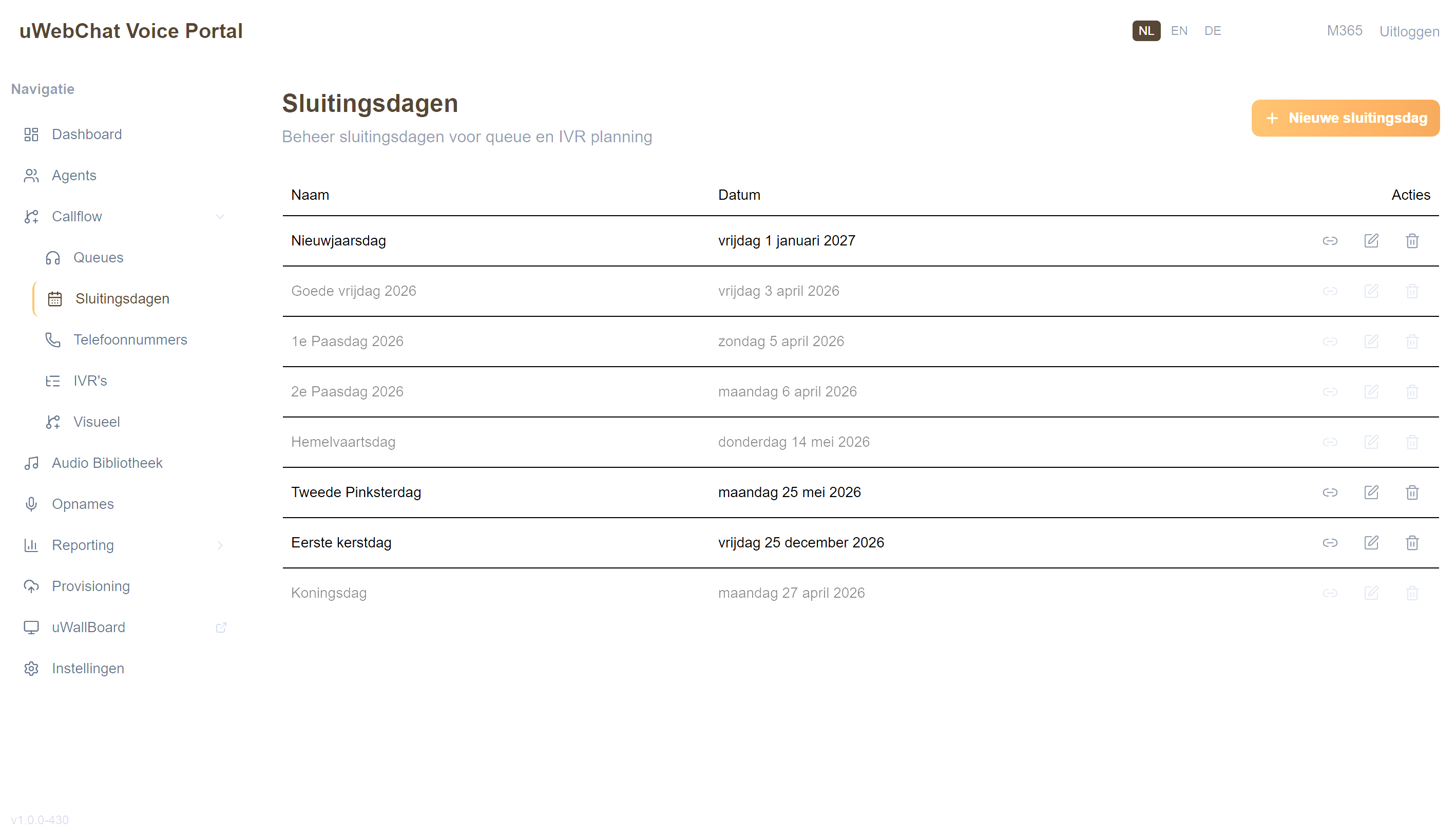
The list shows per closing day:
- Holiday Name (e.g. "Christmas Day")
- Date — formatted as
Friday 25 December 2024 - Actions — Edit, Assign (link icon), Delete
Dates in the past are shown greyed out (opacity-60).
5.3.2 Creating a closing day
- Click + in the top right
- Enter name and date
- Optionally: link a custom audio announcement
- Click Save
5.3.3 Linking a closing day to queues / IVRs
Click the link icon in a row. A modal shows all queues and IVRs; tick which ones should respect this closing day.
You can also link closing days per queue via §5.1.5.
5.3.4 Deleting
Click the trash icon. If the closing day is still linked to agents/queues, you get a 409 error — unlink first.
Pitfalls
- Caller hears the normal announcement on a holiday — closing day was created but not linked to the queue (see §5.3.3).
- Date appears shifted by one day — check time zone settings.