Purpose
A DID (Direct Inward Dial) is an external phone number that arrives in your uCS environment. Here you decide where an incoming call goes: to a queue, an IVR, or directly to an agent.
Required permissions: UWEBCHATVOICE.NUMBERS.VIEW (read) and UWEBCHATVOICE.NUMBERS.MANAGE (modify).
5.4.1 Overview
The Phone numbers page shows all DIDs in your tenant. At a glance you see which numbers are already assigned — and to which queue, IVR or agent — and which are still available (marked with — in the Assigned To column).
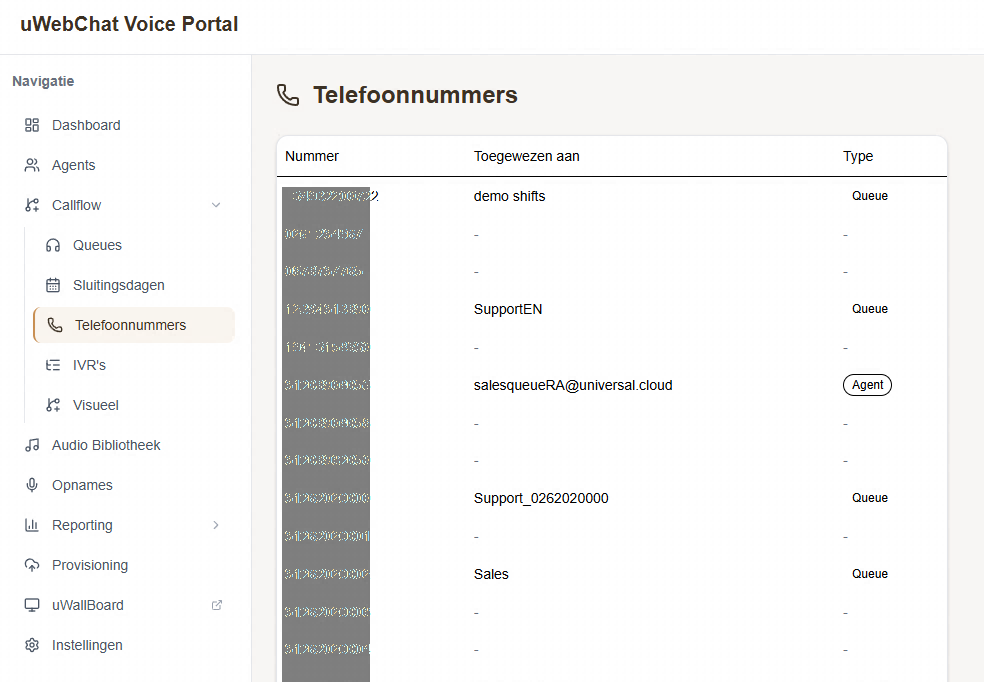
| Column | Meaning |
|---|---|
| Phone Number | The full E.164 number (e.g. 31262020000) |
| Assigned To | Name of the destination (queue/IVR/agent), or — if unused |
| Type | Badge: Queue, IVR, Agent |
This page is read-only. You change routing from the destination page (Queue, IVR or Agent).
5.4.2 Routing a number
- Go to the management view of the destination:
- Queue → §5.1.3, field
Phone Number - IVR → §5.5.2, field
Linked Phone Number - Agent → §4.2, field
Number or Extension
- Select the available number from the dropdown
- Save — the change is immediately active
5.4.3 SIP Trunks
Numbers come in via SIP trunks (connections to your telecom provider). The trunk configuration itself is read-only in the portal and managed on the backend; the portal shows them in dropdowns where relevant.
Pitfalls
- Number doesn't appear in the dropdown — the number is already assigned. Remove the existing link first.
- Caller gets an immediate busy signal — DID is not routed. Check the "Assigned To" column.