Purpose
The Audio Library is the central storage for all sound files that your IVRs and queues play: welcome messages, hold music, closed announcements, IVR menus, etc. You can also have professional voice prompts generated by AI here.
Required permissions: UWEBCHATVOICE.AUDIO.VIEW and UWEBCHATVOICE.AUDIO.UPLOAD. For AI generation: UWEBCHATVOICE.AI.USE.
Two tabs
The page has two tabs:
| Tab | Function |
|---|---|
| Audio Library | Upload, manage and listen to all audio files in your tenant |
| Voice Prompt Generator | Create AI-generated announcements with text-to-speech |
6.1 "Audio Library" tab
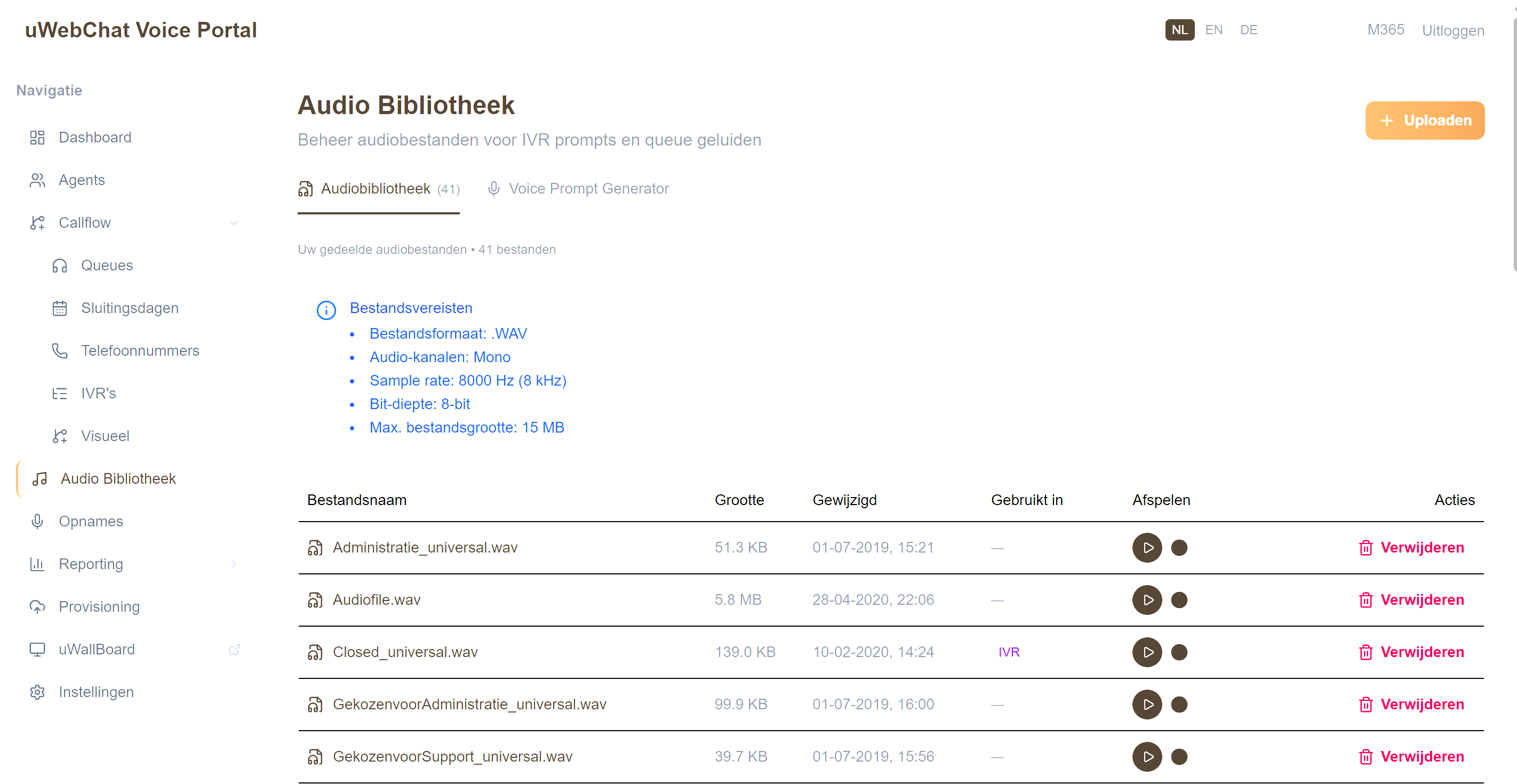
| Column | Meaning |
|---|---|
| File name | Unique per tenant |
| Size | Max 15 MB per file |
| Modified date | When last modified |
| Used in | Badges with the queues/IVRs that use this file |
| Play | Inline audio player |
| Actions | Delete (only when unused) |
6.2 Uploading files
- Click Upload in the top right
- Drop up to 10 files at a time in the modal
- Allowed formats: MP3 or WAV
- Recommended specs: WAV, mono, 8 kHz, 8-bit
Files that don't comply are automatically converted where possible.
6.3 "Voice Prompt Generator" tab
Generate professional announcements with AI. Ideal for:
- Welcome messages ("Welcome to Universal IT")
- IVR menus ("Press 1 for sales, 2 for support…")
- Closed announcements ("Our office is closed today…")
Workflow:
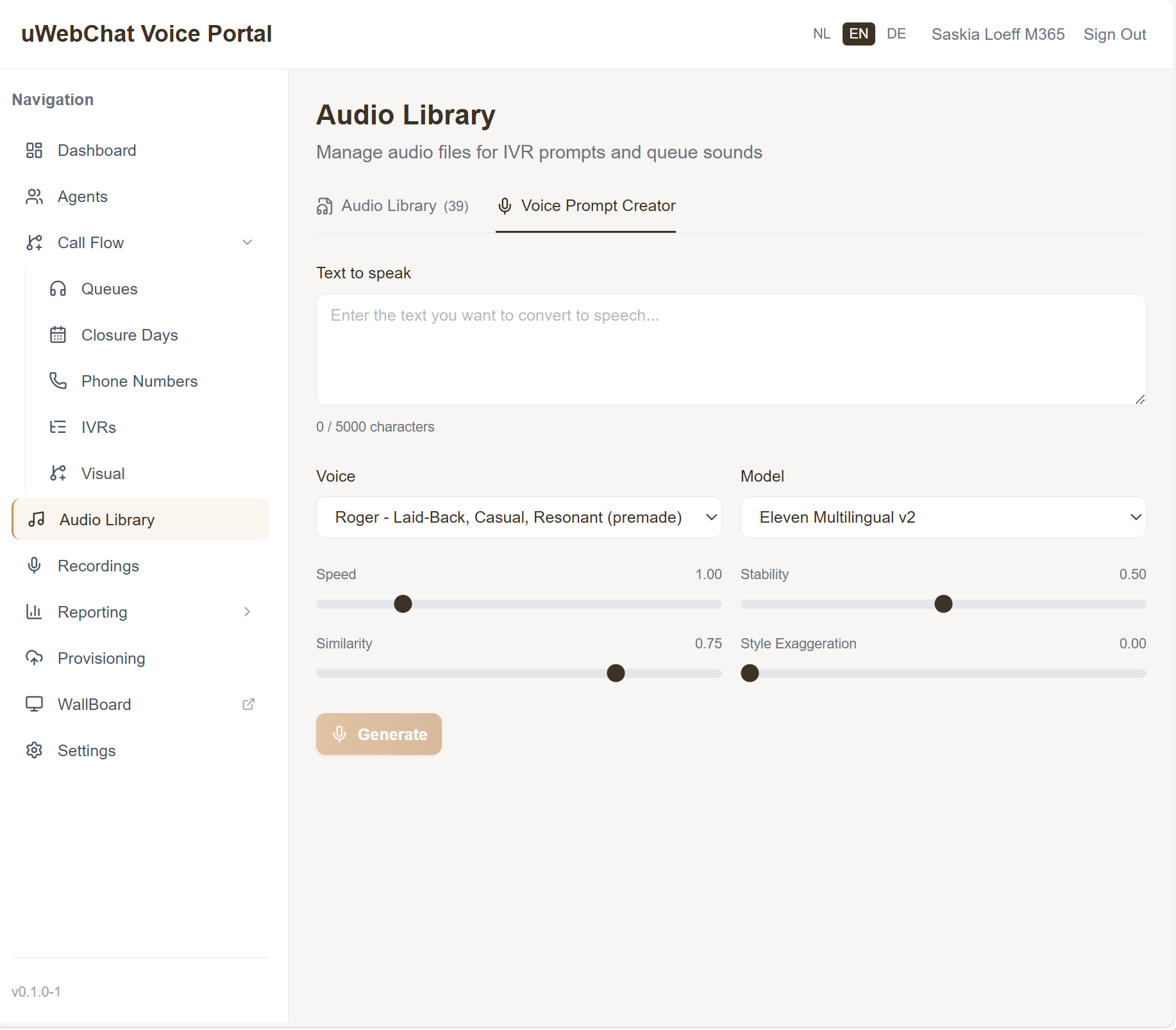
- Type your text (max ~2500 characters)
- Pick a voice from the dropdown (publicly available — no API key needed to see voices)
- Pick a TTS model (Multilingual v2, Turbo, …)
- Adjust sliders:
- Speed — speaking rate
- Stability — naturalness vs. consistency
- Similarity — how closely matched to the reference voice
- Style — expressiveness
- Click Preview to listen (temporary file)
- Happy with it? Enter a file name and click Insert in Library
The system generates the file, automatically converts it to the right audio format and saves it as .wav in your library.
Not happy? Click Discard to remove the temporary file without saving.
6.4 Reference check on delete
You can only delete a file if it's no longer used anywhere. Otherwise you see a warning listing the queues/IVRs still using it. Update those references first.
Pitfalls
- Voice Prompt Generator banner: "No AI key configured" — voices still load (public API), but generating requires a key set in §11.1.
- File doesn't appear in queue dropdown — check whether the upload succeeded (otherwise the file isn't in the list).
- Audio sounds hoarse on playback — source audio sample rate was too high; regenerate or upload as 8 kHz mono.